用Lighttpd这么久了,每次安装都是去搜别人的教程,今天决定自己写一个,也方便以后参考。写的不好高手勿喷,如果有神马改进建议或者发现错误的地方,请直接评论指正。
实测阿里云和腾讯云的Lighttpd都已经可以在yum里面找到了,对于我这种懒人实在是福音。
那么下面介绍下如何安装使用吧,我们一步一步来。
Lighttpd的安装
输入yum install lighttpd lighttpd-fastcgi -y,一步完成,并装上fastcgi为后面的PHP做准备。
安装完后,如无意外可以直接访问你的IP地址看到如下界面了,如果失败,确认你的apache或其他占用80端口的程序服务已停止。

输入service lighttpd start启动您的lighttpd服务。
报错
如果发现一句这样的提示:warning: please use server.use-ipv6 only for hostnames, not without server.bind / empty address; your config will break if the kernel default for IPV6_V6ONLY changes
请修改/etc/lighttpd/lighttpd.conf:
找到server.use-ipv6 = "enable",默认为enable,改为disable
如果发现一具这样的提示:can’t have more connections than fds/2: 1024 1024
请修改/etc/lighttpd/lighttpd.conf:
找到#server.max-fds = 2048,去掉前面的#号后重启Lighttpd
PHP的安装
一样是一句命令即可,根据你自己的需求可以酌情添加,例如php-gd,php-mcrypt等等~
yum install php php-mysql -y这样一来就完成了PHP以及PHP对mysql支持的安装了。
安装好了PHP,需要调整一下Lighttpd的配置方能结合。
1.找到/etc/lighttpd/modules.conf,将include "conf.d/fastcgi.conf"前的”#”去掉,开启模块。
2.找到/etc/lighttpd/conf.d/fastcgi.conf,在最底部加上:
fastcgi.server = (
  ".php" => (
"localhost" => (
"bin-path"=>"/usr/bin/php-cgi",
"socket"=>"tmp/php.socket"
))
)
随后重启Lighttpd,不出意外的话,Lighttpd+php已经完成。
不妨建立一个php文件,写入<?php phpinfo();,可以看到已经支持PHP了,PHP也支持了mysql。
Mysql的安装
最后一步,yum install mysql-server -y,自动安装Mysql。
安装完毕后,启动mysql服务器:service mysqld start
此时直接输入mysql,只要启动成功了,且之前没有安装过mysql,基本可以进入mysql命令行模式啦。
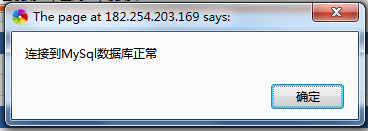
再重启一下Lighttpd,随便找个探针检测一下Mysql是否能够成功连接:
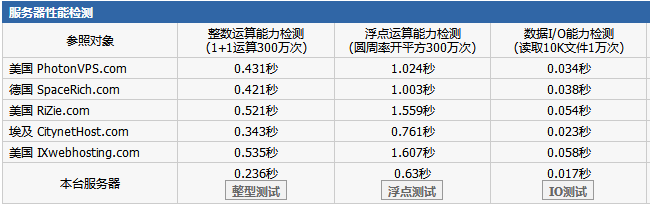
顺手测试了下某云的性能数据:
调优
安装完后可正常使用不代表完事了,还需要一些优化配置,这里仅提供一些思路。
Lighttpd,fastcgi
前面的fastcgi配置,我在我的某个512M服务器上做了点调整:
fastcgi.server = ( ".php" =>
( "localhost" =>
 (
  "socket" => "/var/run/lighttpd/php-fastcgi.socket",
  "bin-path" => "/usr/bin/php-cgi",
  "max-procs" => 4,
  "bin-environment" =>
   (
    "PHP_FCGI_CHILDREN" => "3",
    "PHP_FCGI_MAX_REQUESTS" => "1000"
   )
 )
)
                  )
大概说下意思吧,php-cgi进程数 = max-procs * ( 1 + PHP_FCGI_CHILDREN )。
通俗点说,我设置了最大4个母进程,每个最多带3个子进程,每个子进程被使用1000次后就会死亡,然后重新出现。也就是说我开启Lighttpd只有16个php-cgi进程。这样可以节省一些内存的使用。
Gzip压缩功能的打开(mod_compress),在modules.conf文件中打开,后修改conf.d中相应文件,参考:
server.modules += ( "mod_compress" )
compress.allowed-encodings = ("bzip2", "gzip", "deflate")
compress.cache-dir = "/tmp/lighttpd/cache/compress/"
compress.filetype = ("text/plain", "text/html", "text/javascript", "text/css")
静态资源缓存时间的调整(mod_expire),在modules.conf文件中打开,后修改conf.d中相应文件,参考:
server.modules += ( "mod_expire" )
$HTTP["url"] =~ "(\.png|\.css|\.js|\.jpg|\.gif|\.ico|\.jpeg|\.swf)$"{
expire.url = ( "" => "access 2 months" ) }
至此,Lighttpd可做的优化差不多了。
PHP
php.ini中:
1.调整好时区,搜索date.timezone,设为date.timezone = "Asia/Shanghai"
2.打开短标签功能,搜索short_open,设为short_open_tag = On,这样你就可以不需要打<?php中的”php”了;
3.找到disable_functions,加入你想要禁用的危险函数,默认不禁用,一般禁用为以下,自行决定:
phpinfo,eval,passthru,exec,system,chroot,scandir,chgrp,chown,shell_exec,proc_open,proc_get_status,ini_alter,ini_alter,ini_restore,dl,pfsockopen,openlog,syslog,readlink,symlink,popepassthru,stream_socket_server,fsocket,fsockopen
4.打开PHP中的GZIP: /etc/php.ini
zlib.output_compression = On
zlib.output_handler = On
Mysql
这是默认的mysql配置文件/etc/my.cnf,啥都没。。
[mysqld]
datadir=/var/lib/mysql
socket=/var/lib/mysql/mysql.sock
user=mysql
# Disabling symbolic-links is recommended to prevent assorted security risks
symbolic-links=0

[mysqld_safe]
log-error=/var/log/mysqld.log
pid-file=/var/run/mysqld/mysqld.pid
我给他加了点内容:
[mysqld]
datadir=/var/lib/mysql
socket=/var/lib/mysql/mysql.sock
user=mysql
# Disabling symbolic-links is recommended to prevent assorted security risks
symbolic-links=0
key_buffer = 16K
max_allowed_packet = 1M
thread_stack = 64K
thread_cache_size = 4
sort_buffer = 64K
net_buffer_length = 2K

[mysqld_safe]
log-error=/var/log/mysqld.log
pid-file=/var/run/mysqld/mysqld.pid
优化前:

优化后:

注意了并不是free越大越好的,Linux和windows不一样。上面这样的优化方案,个人认为相对适用于128M内存了。我自己的128M内存和512都是这样配,从来没蹦过,当然了有可能只是因为人流量少。。有机会的话我会更详细的研究,使用一些压力测试工具来测试下什么的。
综合
安装好了,哪天服务器自动重启了怎么办,请用chkconfig将这些服务加入到自动启动中,其实就两个:
chkconfig lighttpd on
chkconfig mysqld on
是否发现PMA无法使用提示session问题,网上怎么找都找不到答案?
试试这个吧:chown root:lighttpd /var/lib/php/session/
PMA空白一片?可以试试yum intall php-mbstring
这样下来基本就差不多了,有空我再把上面说到的mod_compress和mod_expire这两块详细的说一下。
添加你的网站
环境搭建好了,是时候添加网站了,个人比较懒散,多个网站也并没有使用vhost,而是直接在Lighttpd.conf底部直接添加。
普通网站
$HTTP["host"] == "www.gzbx.cc" {
    server.name = "gzbx.cc"
    server.document-root = "/srv/www/gzbx"
    accesslog.filename = log_root + "/gzbx_access.log"
}
泛解析
$HTTP["host"] =~ "^(([a-zA-Z0-9\-]+).zd84.com)$" {
}
拒绝访问
$HTTP["remoteip"] =~ "8.8.8.8|123.123.123.123" {
    url.access-deny = ( "" )
}
SEO优化跳转
$HTTP["host"] == "gzbx.cc" {
    url.redirect = ("^/(.*)" => "http://www.gzbx.cc/$1")
}
有关Vhost的好处,我有空会去研究。